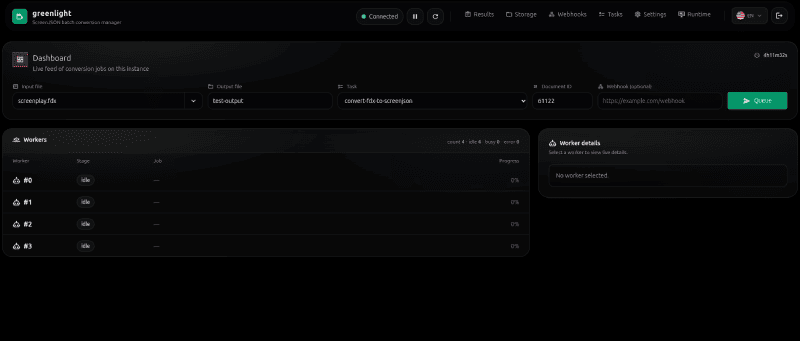
What it is
Greenlight is a job queue manager for ScreenJSON. It’s what you put in
front of an archive of 5,000 .fdx files, or a nightly pipeline that
converts incoming submissions, or a multi-tenant SaaS that needs to
expose conversion as a service without giving every user a shell on the
CLI.
Under the hood it wraps screenjson-cli and adds
everything you need to run that CLI reliably, at scale, against an object
store: a Redis-backed queue, a worker pool, pluggable blob storage (S3,
Azure, MinIO), a pipeline definition language for chaining tasks, a REST
API, WebSocket progress events, and a Svelte admin UI.
S3 ingest → Redis job → Worker claims → Engine runs screenjson CLI → Upload to S3What’s in the box
- Backend in Go. A web server, REST API, WebSocket progress channel, and a worker pool that wraps the
screenjsonbinary. - Frontend in Svelte + Tailwind. A single-page admin UI served by the Go process — job list, live progress, submission form, task catalogue.
- Runtime contract. Every service exposes the same health, OpenAPI, auth, and queue/storage contracts so they compose cleanly.
Tasks
Tasks are declared in config/tasks.yml and composed into pipelines. Out of
the box:
| Task | Input | Output |
|---|---|---|
convert-fdx-to-screenjson | .fdx | ScreenJSON |
convert-fountain-to-screenjson | .fountain | ScreenJSON |
convert-fadein-to-screenjson | .fadein | ScreenJSON |
convert-pdf-to-screenjson | .pdf | ScreenJSON |
export-to-fdx | .json | Final Draft |
export-to-fountain | .json | Fountain |
export-to-fadein | .json | FadeIn |
export-to-pdf | .json | |
validate-screenjson | .json | validation report |
encrypt-screenjson | .json | encrypted ScreenJSON |
decrypt-screenjson | .json | decrypted ScreenJSON |
zip-output | any | ZIP archive |
Pipelines
Pipelines are declarative — an ordered list of tasks with shared variables:
{ "tasks": ["convert-fdx-to-screenjson", "validate-screenjson"] }Multi-format delivery:
{ "tasks": ["export-to-fdx", "export-to-fountain", "export-to-pdf", "zip-output"] }Encrypt-for-distribution with a shared secret:
{
  "tasks": ["convert-fountain-to-screenjson", "encrypt-screenjson"],
  "vars": { "encrypt_key": "mysecretkey123" }
}
Deploy
Docker
docker build -f deployment/Dockerfile -t screenjson/greenlight:latest .Docker Compose
cd deployment
docker-compose up
That starts Redis, MinIO, and Greenlight on port 19000. Drop a file into the
MinIO ingest/ bucket, pick a pipeline in the admin UI, watch it move
through the worker pool.
Kubernetes
Greenlight is designed to scale horizontally. Run the Go binary as a
Deployment, point it at a shared Redis and a shared S3-compatible bucket,
set the worker pool size per-replica, and let Kubernetes handle the rest.
Developer setup
brew install go redis node
cp env.example backend/.env

# Backend
cd backend && go run cmd/greenlight/main.go

# Frontend (separate terminal)
cd frontend && npm i && npm run dev
API
Greenlight’s REST API accepts job submissions, lists queues, and streams progress over WebSocket. The full OpenAPI spec ships in the repo. The docs site has the auth, rate-limit, and webhook notification details.
With screenjson-server
screenjson-server hands its format work to
Greenlight. Files dropped into the server’s import page or POST /imports
in Final Draft, Fade In, Fountain or PDF are converted by Greenlight and
stored in the library when the job finishes; PDF and writer-format exports of
a library script are Greenlight jobs too. List up to five Greenlight servers
in the server’s greenlight.servers and it sends work to whichever are
up. Greenlight itself needs no changes and knows nothing about the
server.
When to use it
Use Greenlight when the CLI alone isn’t enough:
- You have more than one job at a time and you care about order, priority, or retries.
- Your content lives in S3/Azure/MinIO, not on a single disk.
- You need a user-facing UI, a REST API, or webhook notifications for other services.
- You want to scale workers horizontally under Kubernetes.
For a single-file, single-user workflow, screenjson-cli
is the right tool. Greenlight is the tier above that.